

Have questions about Journey? Read through the FAQ below. If you still have questions, e-mail support@tamus.edu.
If you are a finance, HR, payroll, workforce development, or business administrator within The Texas A&M University System, Journey is for you. Journey unites business professionals from across the state of Texas towards one goal: modernize the way we do business. This virtual event helps to bridge knowledge gaps and improve decision-making by demonstrating the connections between the technologies you use daily. The conference spans two half-days and offers recordings available for up to 30 days after the final conference day. During the conference, you will have the opportunity to learn new skills, hear about new features and participate in discussions that will impact the future of work.
You can register for the Journey conference in several ways:
- Visit the event landing page
- Select the “Register Now” button on the Journey website
- Use the “Register Now” link provided in our email communications
Yes, group ticket purchases are available. The purchaser will fill in the buyer information and then provide the relevant details for each ticket holder. Individual tickets will be emailed directly to each ticket holder, and the buyer will receive a payment invoice.
Currently, no group discounts are available for Journey.
No, single-day tickets are not available. Each ticket grants admission to both days of the Journey conference.
First, check your spam or junk mail folder for an email from Accelevents. You can also search your inbox for “Accelevents” to locate your ticket. If you still can’t find it, please contact support@tamus.edu and we’ll resend your ticket.
Yes, you can reassign your ticket to a colleague without affecting payment. Please contact support@tamus.edu to facilitate the transfer. The ticket must be reassigned to your colleague’s email address for them to use it. Note: Do not forward your confirmation email, as it will not be valid for another user.
Yes. Reach out to support@tamus.edu for any refunds needed.
The virtual hub opens two days before the conference begins to allow attendees to update their profiles, explore the profiles of other attendees, presenters and sponsors, and plan their schedule.
You can find the instructions for uploading your profile picture on The Attendee Profile page.
- After signing in, from the event landing page, select the Enter the Pre-Access button.
- On the left side menu, select Regular Sessions.
- To access related documents, select the session and go to the Documents & Links section below the session description.
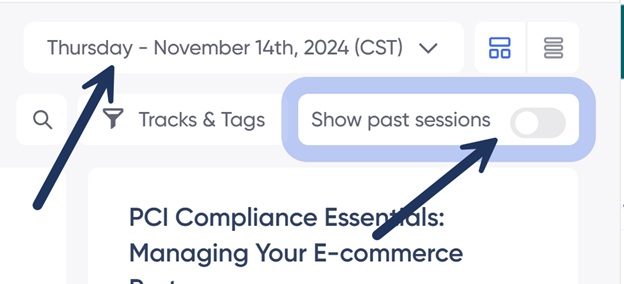
To see past sessions, toggle Show past sessions when viewing the Agenda / Regular Sessions.
Yes, PowerPoint presentations used in Journey Sessions will be accessible for up to 30 days following the end of the conference.
To view the recording of a session, navigate to the session via the Agenda or Regular Sessions links and select the Recording button for the session you would like to view.
Yes. You can earn CPE credit for each session you attend by completing the requirements detailed on the CPE Credit Information page.
CPE certificates will be issued by The Texas A&M University System Office. If all requirements are met, certificates are expected to be mailed by the end of January following the conference. Please note that delays may occur. If you have not received your certificate by January 30, contact us at support@tamus.edu.